
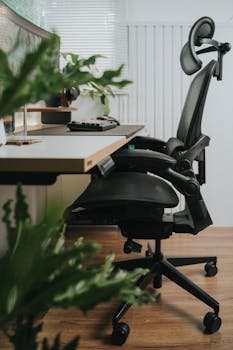
Setting Up a Home Office for Maximum Productivity: Your Guide
Ever notice how your surroundings affect your work? With more jobs shifting home, setting up the perfect office has never felt more important. Productivity and comfort go hand in hand when you’re in your own space.
Designing an effective home office isn’t just about stylish furniture or gadgets. It’s about creating an environment that helps bring out your best focus, minimizes distractions, and boosts efficiency each day you work.
This comprehensive guide unpacks the key elements of high-performing home offices. Dive in and discover practical tips, smart comparisons, and real-life examples to help you create the workspace you’ve always wanted.
Designing Your Workspace for Daily Success
Your workspace should reflect your personality and the way you like to work, while still supporting key principles for productivity. Thoughtful design creates a foundation for effective, enjoyable work-at-home days.
Think of your office setup like cooking: the right ingredients and layout make preparation easier and the outcome better. Rushing or using a cluttered counter slows you down, just like a chaotic workspace hampers your focus.
- Choose a quiet space where household noise is at a minimum and you can close the door.
- Seek natural light for better energy and mood but use light-filtering blinds to reduce screen glare.
- Keep essential items within arm’s reach to avoid breaking flow searching for supplies.
- Avoid placing your desk against distracting views, like TVs or busy hallways.
- Integrate greenery, art, or inspiring decor to personalize the atmosphere and refresh your mind.
Each point above shapes an environment tailored to concentration and comfort. When your space is laid out thoughtfully, staying productive becomes second nature rather than a constant challenge.
The Role of Ergonomics in Comfort and Focus
A friend once shared how swapping a stiff kitchen chair for an adjustable office chair ended her daily backaches and made meetings easier to attend. Comfort truly sets the stage for focused work.
Imagine trying to study at a desk that’s too high, or using a monitor that’s always just out of view. Over time, those little strains add up, draining energy and causing frustration rather than productivity.
Another example: switching from a dim room to a space with ample task lighting eased eye strain and allowed late-night projects to feel less taxing. Comfort-driven choices create the environment for your best output.
Investing in ergonomic essentials—a good chair, an external keyboard and mouse, or a proper monitor stand—pays off in less fatigue and more focused work sessions. Comfort isn’t a luxury; it’s your productivity fuel.
Technology Must-Haves for a Modern Workflow
Having the right technology at your fingertips can be the difference between smooth sailing and daily frustration. Let’s walk through the essentials and see what fits your style and needs.
- Laptop or Desktop: Laptops offer flexibility, but desktops can provide bigger screens and often more power.
- Monitor: A secondary monitor doubles your screen space, ideal for multitasking or comparing documents side by side.
- Keyboard and Mouse: Separate, ergonomic devices reduce wrist strain compared to built-in laptop options.
- Webcam and Microphone: A quality webcam and mic ensure clear, professional video calls and presentations.
- Noise-Canceling Headphones: Essential for blocking background noise during focus periods or online meetings.
- High-Speed Internet: Reliable connectivity means smooth video calls, fast downloads, and less downtime.
- Power Backup: A battery backup or surge protector guards against unexpected outages or power surges.
These tech essentials keep your workflow uninterrupted and efficient, whether you’re collaborating online, drafting reports, or just staying organized.
Lighting and Environment: Setting the Mood
A dimly lit space can feel like a cave, but harsh overhead lighting sometimes creates glare and headaches. Finding the right balance for your home office makes a surprising difference in your focus and mood.
Compare a sunny breakfast nook-turned-office with a shadowy corner of the basement. Natural light tends to boost alertness and motivation, while dim spaces can sap energy. Still, afternoons with too much brightness may call for filters or sheer curtains.
| Lighting Type | Pros | Cons |
|---|---|---|
| Natural Light | Improves mood, energy, and circadian rhythms | Glare and excessive brightness at certain times |
| LED Task Lamp | Adjustable, reduces eye strain, works anytime | Can feel harsh without diffusers |
| Overhead Lighting | Covers wide area, dependable | May create shadows, sometimes causes glare |
The table above shows how different lighting choices have their ups and downs. Mixing sources—like positioning a desk lamp alongside a window—lets you adapt the environment to your workflow and personal preference.
Organizational Strategies for Clutter-Free Efficiency
Keeping your office organized is like keeping a kitchen in order: when everything has its place, prepping work or meals feels less stressful. Let’s dig into practical organization for your workspace.
Stacks of paperwork and tangled cables are a recipe for distraction. A workstation with labeled trays, concealed storage, and cord management tools can transform chaos into a peaceful zone for clear thinking.
Try this: store supplies you use daily where they’re easy to reach, but stash lesser-used items out of sight to keep your primary space open and inviting. A neat desk reduces the mental clutter that saps productivity.
Color-coded files or digital folders speed up finding what you need, much like using spice jars versus rummaging through a cupboard. Over time, these small changes save minutes each day that really add up.
Daily Habits and Routines to Encourage Productivity
- Start each day by tidying your desk for a sense of control and clarity.
- Set clear work hours and stick to them for better work-life boundaries.
- Take regular stretch breaks to reduce eye and body fatigue.
- Eat lunch away from your desk to mentally recharge and avoid burnout.
- Review and prioritize your to-do list at the start and end of your day.
- Check email at set intervals, not continuously, to preserve focus.
By following structured daily routines, you invite predictability into your workday, which is proven to boost productivity. Prioritizing habits like consistent hours and mindful breaks can enhance both output and work satisfaction over time.
Habits might seem small on their own, but when woven into your weekly routine, they shape a work experience that’s less stressful and more fulfilling. Keeping up with these new habits helps reinforce your workspace’s overall efficiency and comfort.
Adapting to Changing Needs and Scenarios
Picture a workspace that evolves with your needs: perhaps you start with a guest room office, but add a standing desk over time for health and flexibility. Adaptable setups can minimize growing pains as your tasks shift.
If your home office doubles as a family room some days, mobile solutions like rolling carts or foldable tables ensure productivity with minimal set-up or tear-down time. This flexibility is especially useful in smaller spaces or shared households.
Comparing fixed workstations to adaptable ones, the latter win for long-term comfort. Swapping out ergonomic accessories or shifting furniture makes it easy to tailor the workspace when projects or seasons change.
Reevaluating and Refining Your Home Office Setup
Reviewing your workspace every few months ensures it continues to match your work style and goals. Maybe you switch positions, add new gear, or find your needs have changed as projects evolve.
List out what’s working, what isn’t, and where even small tweaks might help. Compare your current routine and space against your ideal scenario—what would make you more comfortable or productive tomorrow?
If you find focus flagging, try rearranging furniture, updating lighting, or integrating new tech. Experimenting lets you discover new tricks and tailor your office for ongoing productivity improvements.
Conclusion: Building a Workspace That Works
Designing a home office is an ongoing process. Each decision—from your chair and tech to your daily routines—shapes a workspace that fuels your best work.
Your home office should adapt as your needs change. Regularly reviewing your setup keeps things feeling fresh and effective, not stale or limiting over time.
With thoughtful design, the right habits, and a willingness to adjust, your workspace can become a launchpad for ongoing personal and professional success.
Let these insights inspire you to experiment and refine your environment. Each upgrade or tweak is an investment in more satisfying, efficient, and creative workdays at home.
Ultimately, it’s not about seeking a perfect setup from the start, but about shaping a space that grows with you and unlocks your full productivity potential every day.
